Blake Smith

create. code. learn.

»

A Basement Server Rack is Born

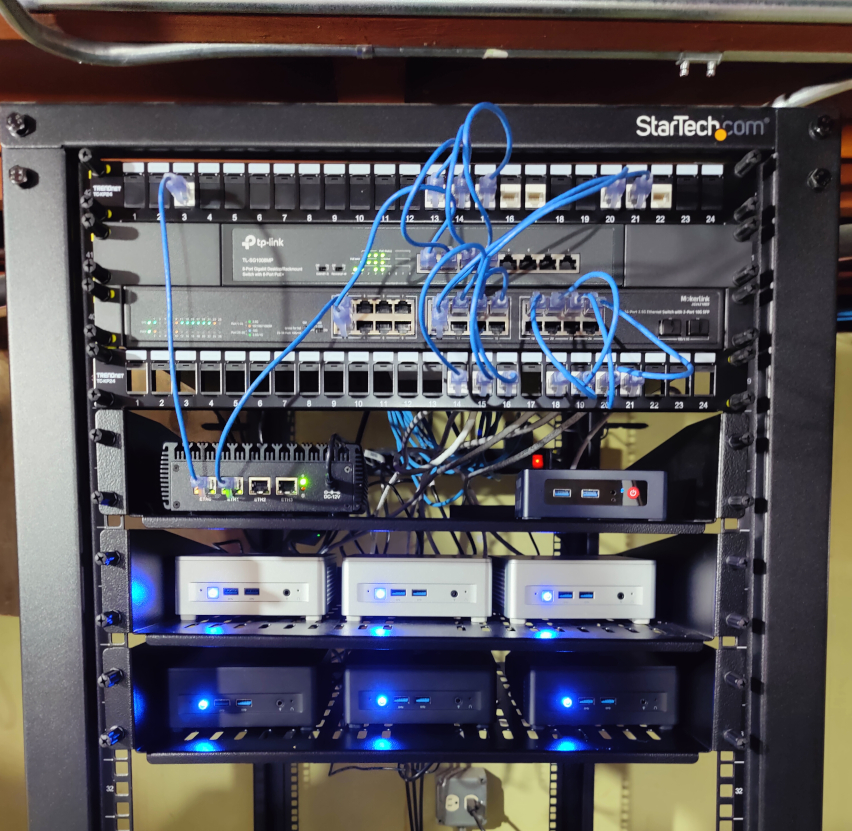
I recently stood up a 42U server rack in my basement. Some people are into cars, I’m into servers. 😁

Basement Server Rack

It’s a bit empty right now, but with plenty of room to expand for future projects! All the CAT6A cables in my house terminate at the patch panel at the top of the rack, with a very basic router / switch setup that plumbs it all together.

The thing I’m more excited about is the 3 node MINISFORUM UM750L mini PC cluster that I’ve started building on top of.

UM750L Picture

I’m programming a custom VM orchestration and control plane on the cluster called “lightbyte”. Currently, the system supports:

  • Dynamically provisioning and placing Firecracker virtual machines on the worker nodes.
  • Provisioning block storage volumes from rootfs images. These images are built via Nix, and automatically get deployed to the cluster during software updates.
  • Scale groups, for dynamically scaling up multiple identical VMs. Sort of like EC2 autoscaling groups. Way overkill for a homelab, but why not?
  • Rudimentary HTTP load balancer / proxy support via pingora. These can target scale groups or individual sets of VMs.
  • Worker draining, to vacate all resources from a host node

Here I create a basic scale group with a configured rootfs image, then scale it up to 5 nodes.

Lightbyte scale group demo

Provisioning is all done via reconciliation controllers in the control plane server processes. Each resource has its own separate controller that’s responsible for reconciliating desired resource state (stored across all 3 etcd nodes), against the current state of running resources on each worker.

Once VMs boot, they bridge to the physical network via a Linux bridge.

Lightbyte VM access

HTTP load balancers run inside guest VMs themselves, owned and managed by their own scale group. Once I implement DNS in the cluster, my plan is to have DNS records that will round-robin across multiple proxy VMs, which themselves will proxy to other underlying scale groups or collections of VMs. I dynamically push backend topology changes to the proxy guests over a guest vsock socket server. This vsock socket allows the host machine to orchestrate the guest and push configuration changes without the guest needing to talk to the control plane directly.

Lightbyte load balancer

Here are some of the software details:

  • Implemented in Rust. Control plane, worker agents, guest agents, command line clients, etc.
  • Control plane database is etcd, running on all 3 nodes, which stores all resource object state. I use etcd transactions to perform transactionally correct read-modify-write on the objects. Reconciliation controllers are leader-elected with etcd and executed on the control plane nodes. I use leader election to make sure there’s only 1 controller of each resource type running at a time.
  • Workers all run NixOS. The entire system is deployed and updated with a single command via colmena.
  • I’m using firecracker for the Vmm, which sits on top of Linux KVM for the hypervisor.

This has been a fun one to build. I’m looking forward to stabilizing things enough to use the system for all my homelab services. It’s a little baby homelab cloud!


»

Connecting Firecracker VMs to Crucible Network Block Storage - Part 2

This is a blog series covering how to connect a firecracker VM to network block storage. Read Part 1 here.

In part 1, we taught the Firecracker VMM how to perform block-based disk operations using crucible volumes as our backing store. This helped us validate the connective interface between the existing Firecracker virtio block device implementation, and the existing crucible Volume interface. It worked quite well (save the impedence between crucible’s use of async rust, and firecracker choosing to avoid async rust in favor of blocking operations).

But we left a few things out:

  1. Runtime configuration of crucible volumes when firecracker VMs are started. We need to start a firecracker VM and configure our virtio block device in the existing firecracker VM configuration.
  2. Connecting to crucible volumes over network attached storage to the “downstairs” TCP servers that manage the underlying physical disks and serve up block operations. Our previous post only used an in-memory block structure.
  3. Correct disk volume metadata, such as disk size. We faked it with a dummy ext4 volume, but we need firecracker to correctly detect the volume size based on how the crucible volume is configured.

This gets us 90% of the way towards our desired goal: Having firecracker support remote network attached block devices.

Let’s fix these issue now!

Volume Configuration

Previously, we took the shortest path to getting something working: hardcoded crucible Volume building. Let’s add a crucible based configuration structure to the vmm_config module, which we’ll use to build our volumes dynamically:

From firecracker/src/vmm/src/vmm_config/crucible.rs:

use serde::{Deserialize, Serialize};

/// Configure remote crucible block storage drives
#[derive(Clone, Debug, PartialEq, Eq, Deserialize, Serialize)]
#[serde(tag = "type")]
pub enum CrucibleConfig {
    /// Attach a crucible volume over the network to downstairs
    /// targets.
    Network {
        /// List of host:port socket addresses for the downstairs volumes
        downstairs_targets: Vec<String>,

        /// Volume generation id. Used each time a block device is moved / reattached
        /// to a virtual machine to prevent concurrent usage.
        volume_generation: u64,
    },
    /// Attach a crucible volume with in-memory state
    InMemory {
        /// Size for each block.
        block_size: u64,

        /// Overall volume / disk size.
        disk_size: usize,
    },
}

We support attaching two different volume enumerations: Attached over the network, or in-memory. The crucible upstairs also supports a “pseudo-file” BlockIO implementation that has overlapping functionality with the existing firecracker file-backed disks. We might add this later, but let’s just stick with these two cases for now.

We add this config enum to the main BlockDeviceConfig structure, that directly interfaces with the user to configure the firecracker VM’s block storage. This is eventually translated into a VirtioBlockConfig struct that gets used when we build our underlying disk.

From firecracker/src/vmm/src/vmm_config/drive.rs:

/// Use this structure to set up the Block Device before booting the kernel.
#[derive(Debug, Default, PartialEq, Eq, Deserialize, Serialize)]
#[serde(deny_unknown_fields)]
pub struct BlockDeviceConfig {
    /// Unique identifier of the drive.
    pub drive_id: String,
    /// Part-UUID. Represents the unique id of the boot partition of this device. It is
    /// optional and it will be used only if the `is_root_device` field is true.
    pub partuuid: Option<String>,
    /// If set to true, it makes the current device the root block device.
    /// Setting this flag to true will mount the block device in the
    /// guest under /dev/vda unless the partuuid is present.
    pub is_root_device: bool,
    /// If set to true, the drive will ignore flush requests coming from
    /// the guest driver.
    #[serde(default)]
    pub cache_type: CacheType,

    // VirtioBlock specific fields
    /// If set to true, the drive is opened in read-only mode. Otherwise, the
    /// drive is opened as read-write.
    pub is_read_only: Option<bool>,
    /// Path of the drive.
    pub path_on_host: Option<String>,
    /// Rate Limiter for I/O operations.
    pub rate_limiter: Option<RateLimiterConfig>,
    /// Crucible configuration.
    /// Only set when io_engine is 'Crucible'
    pub crucible: Option<CrucibleConfig>,
    /// The type of IO engine used by the device.
    // #[serde(default)]
    // #[serde(rename = "io_engine")]
    // pub file_engine_type: FileEngineType,
    #[serde(rename = "io_engine")]
    pub file_engine_type: Option<FileEngineType>,
    // VhostUserBlock specific fields
    /// Path to the vhost-user socket.
    pub socket: Option<String>,
}

CrucibleEngine Over the Network

Let’s expand our CrucibleEngine implementation from before, and add support for constructing crucible remote network attached block volumes.

From firecracker/src/vmm/src/devices/virtio/block/virtio/io/crucible.rs:

impl CrucibleEngine {
    /// Mount a network attached volume
    pub fn with_network_volume(
        rt: Arc<Runtime>,
        options: CrucibleOpts,
        extent_info: RegionExtentInfo,
        volume_generation: u64,
    ) -> Result<Self, anyhow::Error> {
        let block_size = extent_info.block_size;
        let volume = rt.block_on(async {
            Self::network_attached_downstairs_volume(options, extent_info, volume_generation).await
        })?;
        let mut buf = crucible::Buffer::new(1, block_size as usize);
        Ok(Self {
            volume,
            rt,
            block_size,
            buf,
        })
    }

    async fn network_attached_downstairs_volume(
        options: CrucibleOpts,
        extent_info: RegionExtentInfo,
        volume_generation: u64,
    ) -> Result<Volume, anyhow::Error> {
        let volume_logger = crucible_common::build_logger_with_level(slog::Level::Info);
        let mut builder = VolumeBuilder::new(extent_info.block_size, volume_logger);
        builder
            .add_subvolume_create_guest(options.clone(), extent_info, volume_generation, None)
            .await?;
        let volume = Volume::from(builder);
        info!(
            "Successfully added volume from downstairs targets: {:?}",
            options.target
        );

        // Before we use the volume, we must activate it, and ensure it's active
        info!("Activating crucible volume");
        volume.activate_with_gen(volume_generation).await?;
        info!("Waiting to query the work queue before sending I/O");
        volume.query_work_queue().await?;

        let _ = Self::wait_for_active_upstairs(&volume).await?;

        info!("Upstairs is active. Volume built and ready for I/O");
        Ok(volume)
    }
}

Rather than use the previous CrucibleEngine#with_in_memory_volume, we add a top-level constructor for CrucibleEngine#with_network_volume.

Breaking down the arguments:

  1. Arc<Runtime>: The tokio runtime to use with volume operations. Again, firecracker doesn’t utilize async I/O, so we provide it for the CrucibleEngine.
  2. CrucibleOpts: crucible upstairs / client configuration options. Most criticially, this includes our downstairs targets to connect to.
  3. RegionExtentInfo: Metadata queried from the crucible downstairs repair port. Provides block_size, extent_count and blocks_per_extent, which can be used for overall volume size calculations.
  4. volume_generation: Concurrency safety mechanism that prevents “split-brain” scenarios (multiple VMs mounting the same volume). The downstairs server will favor the highest generation counter, used in conjunction with a centralized control plane that increments the generation number each time a volume is moved or attached to a new VM.

Encapsulated FileEngine and Disk Properties

Firecracker uses the DiskProperties structure to both determine overall disk metadata such as the disk size, as well as build the FileEngine struct for block I/O. We’ll kill two birds with one stone: Cleanup how our FileEngine gets built, but also return the correct disk size metadata to the virtio layer during boot.

Here’s our new revised DiskProperties code, that more cleanly supports the existing firecracker FileEngine, and our new crucible one. We revise the main entry point to switch on engine type from the config:

From firecracker/src/vmm/src/devices/virtio/block/virtio/device.rs:

impl DiskProperties {
        /// Create a new disk from the given VirtoioBlockConfig.
    pub fn from_config(config: &VirtioBlockConfig) -> Result<Self, VirtioBlockError> {
        match config.file_engine_type {
            FileEngineType::Sync | FileEngineType::Async => Self::from_file(config.path_on_host.clone(), config.is_read_only, config.file_engine_type),
            FileEngineType::Crucible => Self::from_crucible(&config.crucible.as_ref().expect("Crucible block device configuration must always be present in the 'crucible' field when file_engine_type is 'Crucible'")),
        }
    }
}

We renamed the previous DiskProperties::new function to DiskProperties#from_file, and added a new DiskProperties#from_crucible.

This now serves as the main entry-point into building crucible based volumes (both in-memory, as well as our new network attached). Let’s take a look here:

impl DiskProperties {
   pub fn from_crucible(crucible_config: &CrucibleConfig) -> Result<Self, VirtioBlockError> {
        // Firecracker doesn't use async rust or tokio, but crucible library operations
        // depend on an async runtime. We might want to push this up the stack at some
        // point.
        let rt =
            Arc::new(tokio::runtime::Runtime::new().expect("Could not construct a tokio runtime"));
        let (disk_size, crucible_engine) = match crucible_config {
            CrucibleConfig::Network {
                downstairs_targets,
                volume_generation,
            } => {
                let targets = downstairs_targets
                    .iter()
                    .map(|target| {
                        target.parse::<SocketAddr>().map_err(|err| {
                            error!(
                                "Error parsing crucible target: {}, error: {:?}",
                                target, err
                            );
                            VirtioBlockError::Config
                        })
                    })
                    .collect::<Result<Vec<SocketAddr>, VirtioBlockError>>()?;
                let (region_extent_info, disk_size) = Self::volume_size(&rt, &targets)?;
                let options = crucible_client_types::CrucibleOpts {
                    target: targets,
                    ..Default::default()
                };
                let crucible_engine = CrucibleEngine::with_network_volume(
                    rt,
                    options,
                    region_extent_info,
                    *volume_generation,
                )
                .map_err(|err| VirtioBlockError::FileEngine(BlockIoError::Crucible(err)))?;
                (disk_size, crucible_engine)
            }
            CrucibleConfig::InMemory {
                block_size,
                disk_size,
            } => {
                let crucible_engine =
                    CrucibleEngine::with_in_memory_volume(rt, *block_size, *disk_size)
                        .map_err(|err| VirtioBlockError::FileEngine(BlockIoError::Crucible(err)))?;
                (*disk_size as u64, crucible_engine)
            }
        };

        let mut image_id = [0; VIRTIO_BLK_ID_BYTES as usize];
        let engine = FileEngine::Crucible(crucible_engine);
        Ok(Self {
            file_path: "".to_string(), // TODO: Remove file path
            file_engine: engine,
            nsectors: disk_size >> SECTOR_SHIFT,
            image_id,
        })
    }
}

Breaking down the network case, the high level steps are:

  1. Lookup the volume metadata (region extent info) from the given downstairs servers. This is used to determine block_size as well as overall disk size.
  2. Contstruct the underlying CrucibleEngine, from the configuration options. This includes the downstairs target TCP servers, and the volume generation we configured before.
  3. Stub out a image_id. We’ll eventually update this, especially if we want to attach multiple crucible volumes to the same VM.

There’s still some lingering coupling to the file based storage, with the file_path field property that’s not relevant in the case of crucible volumes.

Putting it Together

Let’s put it all together, and fire a VM up. First, let’s configure our machine to talk over the network. We’ll modify our previous firecracker VM machine configuration.

From firecracker/scripts/crucible_network.json:

{
  "boot-source": {
    "kernel_image_path": ".kernel/vmlinux-6.1.141.1",
    "boot_args": "console=ttyS0 reboot=k panic=1 pci=off"
  },
  "logger": {
    "log_path": "test_machine.log",
    "level": "debug"
  },
  "drives": [
    {
      "drive_id": "rootfs",
      "path_on_host": ".kernel/ubuntu-24.04.ext4",
      "is_root_device": true,
      "is_read_only": false
    },
    {
      "drive_id": "storage",
      "path_on_host": "storage.ext4",
      "is_root_device": false,
      "is_read_only": false,
      "io_engine": "Crucible",
      "crucible": {
        "type": "Network",
        "downstairs_targets": [
          "127.0.0.1:3810",
          "127.0.0.1:3820",
          "127.0.0.1:3830"
        ],
        "volume_generation": 1
      }
    }
  ],
  "machine-config": {
    "vcpu_count": 1,
    "mem_size_mib": 1024
  }
}

This configuration lays out 3 downstairs servers to connect in order to access volume block data, along with the volume generation. Volume generations always start at 1 and increment for each volume move / attachment event.

Note that crucible downstairs volumes are always replicated, and each replica runs in an isolated process with its own socket address. In a multi-host setup, the control plane would be responsible for starting / stopping these downstairs processes during volume provisioning.

Let’s manually provision each downstairs volume, and start 3 downstairs processes. We’ll make a 100MB volume replicated across all 3 downstairs servers. In your local crucible checkout:

# First, provision 3 100MB volumes in the data directory, each with their own unique UUID
# Overall volume size is calculated with: $block_size * $extent_size * $extent_count.

$ cargo run --bin crucible-downstairs -- create -d data/3810 -u $(uuidgen) --block-size 512 --extent-count 100 --extent-size 2048
$ cargo run --bin crucible-downstairs -- create -d data/3820 -u $(uuidgen) --block-size 512 --extent-count 100 --extent-size 2048
$ cargo run --bin crucible-downstairs -- create -d data/3830 -u $(uuidgen) --block-size 512 --extent-count 100 --extent-size 2048

# Now, in 3 separate terminal windows, start a server process for each volume downstairs.

$ cargo run --bin crucible-downstairs -- run -d data/3810 -p 3810
$ cargo run --bin crucible-downstairs -- run -d data/3820 -p 3820
$ cargo run --bin crucible-downstairs -- run -d data/3830 -p 3830

Our block storage backend / servers are ready. Let’s fire up our firecracker VM.

Back in the firecracker git checkout:

# Start a new firecracker VM, with the crucible_network.json VM configuration. 

$ cargo run --bin firecracker -- --api-sock /tmp/fc0.sock --config-file ./scripts/crucible_network.json

Starting up the firecracker VM, we should see logs confirming correct conneciton to the crucible downstairs servers:

From test_machine.log:

2025-10-17T08:22:29.246964209 [anonymous-instance:main] Looking up region extent information from: http://127.0.0.1:7810
2025-10-17T08:22:29.248154545 [anonymous-instance:main] starting new connection: http://127.0.0.1:7810/
2025-10-17T08:22:29.250181813 [anonymous-instance:main] Remote region extent info from http://127.0.0.1:7810 is: RegionDefinition { block_size: 512, extent_size: Block { value: 100, shift: 9 }, extent_count: 2048, uuid: 282337c4-851e-4e3d-9b78-9cd984
7b0f53, encrypted: false, database_read_version: 1, database_write_version: 1 }
2025-10-17T08:22:29.253353020 [anonymous-instance:main] Successfully added volume from downstairs targets: [127.0.0.1:3810, 127.0.0.1:3820, 127.0.0.1:3830]
2025-10-17T08:22:29.253382907 [anonymous-instance:main] Activating crucible volume
2025-10-17T08:22:29.412650382 [anonymous-instance:main] Waiting to query the work queue before sending I/O
2025-10-17T08:22:29.412912033 [anonymous-instance:main] Upstairs is active. Volume built and ready for I/O
2025-10-17T08:22:29.782137041 [anonymous-instance:main] Crucible read. offset: 0, addr: GuestAddress(49954816), count: 4096
2025-10-17T08:22:31.053296057 [anonymous-instance:main] Crucible read. offset: 0, addr: GuestAddress(72134656), count: 4096
2025-10-17T08:22:31.056033575 [anonymous-instance:main] Crucible read. offset: 16384, addr: GuestAddress(62717952), count: 4096
2025-10-17T08:22:31.057059658 [anonymous-instance:main] Crucible read. offset: 32768, addr: GuestAddress(72376320), count: 4096

Notice that we connect to the “recovery port” for metadata lookup. This port is also running on each downstairs server, in addition to the main port for upstairs clients.

We’ve got good looking log lines, does the volume work?

Ubuntu 24.04.2 LTS ubuntu-fc-uvm ttyS0

ubuntu-fc-uvm login: root (automatic login)

Welcome to Ubuntu 24.04.2 LTS (GNU/Linux 6.1.141 x86_64)

 * Documentation:  https://help.ubuntu.com
 * Management:     https://landscape.canonical.com
 * Support:        https://ubuntu.com/pro

This system has been minimized by removing packages and content that are
not required on a system that users do not log into.

To restore this content, you can run the 'unminimize' command.
root@ubuntu-fc-uvm:~# lsblk
NAME
    MAJ:MIN RM  SIZE RO TYPE MOUNTPOINTS
vda 254:0    0    1G  0 disk /
vdb 254:16   0  100M  0 disk

When we list block devices, we are still getting the correct block device size, even without the dummy .ext4 file. Let’s see if we can do some block operations:

root@ubuntu-fc-uvm:~# mkfs.ext4 /dev/vdb
mke2fs 1.47.0 (5-Feb-2023)
Creating filesystem with 25600 4k blocks and 25600 inodes

Allocating group tables: done
Writing inode tables: done
Creating journal (1024 blocks): done
Writing superblocks and filesystem accounting information: done

root@ubuntu-fc-uvm:~# mount -t ext4 /dev/vdb /mnt/storage/
root@ubuntu-fc-uvm:~# ls -lah /mnt/storage/
total 24K
drwxr-xr-x 3 root root 4.0K Oct 17 16:17 .
drwxr-xr-x 3 root root 4.0K Oct 11 22:15 ..
drwx------ 2 root root  16K Oct 17 16:17 lost+found
root@ubuntu-fc-uvm:~# echo "Hello network attached crucible!" > /mnt/storage/hello
root@ubuntu-fc-uvm:~# cat /mnt/storage/hello
Hello network attached crucible!
root@ubuntu-fc-uvm:~#

Woohoo! Not only are our block operations working, but we’re sending them over the network, using the very simple Crucible TCP protocol. Separation of compute and storage gives us flexibility and mobility as we might move underlying hosts around in a larger VM infrastructure. In a production network, we’d want very high speed networking for block data operations.

Wrapping Up

In this 2-part series, we went from a stock firecracker source checkout, to plugging in crucible based network attached block devices. In crucible lingo, we connected our ‘upstairs’ firecracker VMM process to our ‘downstairs’ crucible TCP servers that manage the underlying durable storage on disks.

Where do we go from here? Here’s what’s on the top of my mind:

  • Cleanup additional FileEngine coupling: There’s still some lingering coupling in the firecracker code. In our new setup, we can’t always assume we have a backing local VM file (the disk might be remote over the network). There’s some more work to do to cleanly abstract these pieces away.
  • Convert FileEngine to an open trait, rather than a closed enumeration. It would be easier to support pluggable disk backends with a pluggable trait that encapsulates all the necessary operations required for a block device backend. As such, there’s quite a few places scattered through the code that make assumptions on these closed enumerations.
  • Extensive stress testing, especially for performance at high I/O rates.
  • Wire this into a simple control plane, to support dynamically provisioning VMs and block volumes.

I’d like to send some of these patches upstream to firecracker, so it’s easier to support pluggable disk backends. In the meantime, I’ll maintain a branch on GitHub that can track upstream.

UPDATE: There’s now a nix flake to build this custom version of firecracker. Try it out:

$ nix build 'github:blakesmith/firecracker/crucible-tracking'

»

Connecting Firecracker VMs to Oxide Computer's Crucible Block Storage

This is a blog post covering how to connect a firecracker VM to network block storage. Read Part 2 here.

In this post, I’ll walk you through how I connected a firecracker VM to a network attached block storage system by called crucible.

Crucible is written by the good folks at Oxide Computer, to power network attached block volumes in their custom cloud based server rack. It has a lot of desirable properties that make it a ripe target to integrate with the firecracker VMM:

  • It’s written in Rust, the same as firecracker itself, easing integration.
  • Oxide’s own VMM (called propolis), hooks into the crucible storage system using a similar VirtIO device layer as firecracker (Along with an NVMe interface).
  • It’s simple. Other storage systems like Ceph are great, but have a lot more moving pieces that are harder to work with.

Oxide’s rack platform is based on the illumos unix operating system, with bhyve as the underlying hypervisor. If we want to target firecracker on Linux, we’ll need to add some additional plumbing.

Here’s a rough sketch of what we’re going for:

Firecracker and Crucible Architecture.

Let’s take a look at the main crucible BlockIO interface, and unpack its basic operations so we can understand our integration surface area.

Crucible BlockIO Interface

The BlockIO interface is the main entrypoint for all block operations to crucible. It exposes simple read, write, and flush operations using an async Rust trait:

/// The BlockIO trait behaves like a physical NVMe disk (or a virtio virtual
/// disk): there is no contract about what order operations that are submitted
/// between flushes are performed in.
#[async_trait]
pub trait BlockIO: Sync {
    /*
     * `read`, `write`, and `write_unwritten` accept a block offset, and data
     * buffer size must be a multiple of block size.
     */

    async fn read(
        &self,
        offset: BlockIndex,
        data: &mut Buffer,
    ) -> Result<(), CrucibleError>;

    async fn write(
        &self,
        offset: BlockIndex,
        data: BytesMut,
    ) -> Result<(), CrucibleError>;

    async fn write_unwritten(
        &self,
        offset: BlockIndex,
        data: BytesMut,
    ) -> Result<(), CrucibleError>;

    async fn flush(
        &self,
        snapshot_details: Option<SnapshotDetails>,
    ) -> Result<(), CrucibleError>;
}

In the firecracker code, we’re going to wire up our VirtIO storage operations to crucible’s Volume type. This implements the BlockIO trait interface, and also abstracts away the concept of “subvolumes” (useful for building layered block devices).

Let’s add the bare minimum to firecracker to get a virtio disk to perform no-op block operations, and emit log lines to the firecracker machine log.

From firecracker/src/vmm/src/devices/virtio/block/virtio/io/crucible.rs:

use crate::logger::debug;
use crate::vstate::memory::{GuestAddress, GuestMemoryMmap};

#[derive(Debug, displaydoc::Display)]
pub enum CrucibleError {
}

#[derive(Debug)]
pub struct CrucibleEngine {
}

impl CrucibleEngine {
    pub fn read(
        &mut self,
        offset: u64,
        mem: &GuestMemoryMmap,
        addr: GuestAddress,
        count: u32,
    ) -> Result<u32, CrucibleError> {
        debug!("Crucible read. offset: {}, addr: {:?}, count: {}", offset, addr, count);
        Ok(0)
    }

    pub fn write(
        &mut self,
        offset: u64,
        mem: &GuestMemoryMmap,
        addr: GuestAddress,
        count: u32,
    ) -> Result<u32, CrucibleError> {
        debug!("Crucible write. offset: {}, addr: {:?}, count: {}", offset, addr, count);
        Ok(0)
    }

    pub fn flush(&mut self) -> Result<(), CrucibleError> {
        debug!("Crucible flush.");
        Ok(())
    }
}

We’ll be temporarily hooking up our CrucibleEngine type to the firecracker FileEngine type. This is a temporary hack, to work around the fact that firecracker only supports host files for its block storage backend (no network volume support in sight!). Since we want to eventually hook firecracker up to crucible over the network, we’ll need to refactor this out to a cleaner interface down the road.

For now though, we’ll just add enum variants of FileEngine, FileEngineType, and a few other error and metadata types throughout the existing firecracker VirtIO machinery.

diff --git a/src/vmm/src/devices/virtio/block/virtio/io/mod.rs b/src/vmm/src/devices/virtio/block/virtio/io/mod.rs
index 09cc7c4e31..c5d9880f25 100644
--- a/src/vmm/src/devices/virtio/block/virtio/io/mod.rs
+++ b/src/vmm/src/devices/virtio/block/virtio/io/mod.rs
@@ -2,6 +2,7 @@
 // SPDX-License-Identifier: Apache-2.0

 pub mod async_io;
+pub mod crucible;
 pub mod sync_io;

 use std::fmt::Debug;
@@ -9,6 +10,8 @@

 pub use self::async_io::{AsyncFileEngine, AsyncIoError};
 pub use self::sync_io::{SyncFileEngine, SyncIoError};
+pub use self::crucible::{CrucibleEngine, CrucibleError};
+
 use crate::devices::virtio::block::virtio::PendingRequest;
 use crate::devices::virtio::block::virtio::device::FileEngineType;
 use crate::vstate::memory::{GuestAddress, GuestMemoryMmap};
@@ -31,6 +34,8 @@
     Sync(SyncIoError),
     /// Async error: {0}
     Async(AsyncIoError),
+    /// Crucible error: {0}
+    Crucible(CrucibleError),
 }

 impl BlockIoError {
@@ -54,6 +59,7 @@
     #[allow(unused)]
     Async(AsyncFileEngine),
     Sync(SyncFileEngine),
+    Crucible(CrucibleEngine),
 }
diff --git a/src/vmm/src/devices/virtio/block/virtio/device.rs b/src/vmm/src/devices/virtio/block/virtio/device.rs
index ecdd8ee4f6..61ce02911d 100644
--- a/src/vmm/src/devices/virtio/block/virtio/device.rs
+++ b/src/vmm/src/devices/virtio/block/virtio/device.rs
@@ -50,6 +50,9 @@
     /// Use a Sync engine, based on blocking system calls.
     #[default]
     Sync,
+
+    // Use a Crucible, remote network block storage backend.
+    Crucible,
 }

You can see a more exhaustive change of stubbing out the basic virtio interfaces in this commit.

Now let’s try starting a firecracker VM, and have it use our new Crucible FileEngineType. I recommend following the firecracker getting-started docs to download a minimal linux kernel, and a simple ubuntu 24.04 rootfs that we can use for booting.

From firecracker/scripts/test_machine.json:

{
  "boot-source": {
    "kernel_image_path": ".kernel/vmlinux-6.1.141.1",
    "boot_args": "console=ttyS0 reboot=k panic=1 pci=off"
  },
  "logger": {
    "log_path": "test_machine.log",
    "level": "debug"
  },
  "drives": [
    {
      "drive_id": "rootfs",
      "path_on_host": ".kernel/ubuntu-24.04.ext4",
      "is_root_device": true,
      "is_read_only": false
    },
    {
      "drive_id": "storage",
      "path_on_host": "storage.ext4",
      "is_root_device": false,
      "is_read_only": false,
      "io_engine": "Crucible"
    }
  ],
  "machine-config": {
    "vcpu_count": 1,
    "mem_size_mib": 1024
  }
}

Note a few things going on here:

  1. Most of this is standard firecracker configuration. We use both the linux kernel image, and ubuntu rootfs from the firecracker getting started docs above.
  2. In addition to our rootfs, we attach an additional disk, and then specify an io_engine of Crucible.
  3. We setup debug logging to a file that resides on the host, so we can see debug output from our storage calls and other debug info within the vmm.

Eagle eyed readers will notice that we’re kludging onto the existing path_on_host FileEngine configuration parameter. This is temporarily required for the firecracker I/O pipeline to respond to other virtio protocol operations such as detecting the total disk size. We’ll fix this down the road, but for now, let’s write out a 100 megabyte ext4 volume on our host machine.

$ dd if=/dev/zero of=storage.ext4 bs=1M count=100
$ mkfs.ext4 storage.ext4

Let’s run this thing!

From the firecracker root:

$ cargo run --bin firecracker -- --api-sock /tmp/fc0.sock --config-file ./scripts/test_machine.json

After the VM boots, you’ll see our stubbed out crucible log lines in test_machine.log:

$ cat test_machine.log
2025-10-11T17:23:52.669778605 [anonymous-instance:main] Successfully started microvm that was configured from one single json
2025-10-11T17:23:52.678229324 [anonymous-instance:fc_vcpu 0] vcpu: IO write @ 0xcf8:0x4 failed: bus_error: MissingAddressRange
2025-10-11T17:23:52.678273670 [anonymous-instance:fc_vcpu 0] vcpu: IO read @ 0xcfc:0x2 failed: bus_error: MissingAddressRange
2025-10-11T17:23:52.843229440 [anonymous-instance:fc_vcpu 0] vcpu: IO read @ 0x87:0x1 failed: bus_error: MissingAddressRange
2025-10-11T17:23:52.871489216 [anonymous-instance:main] Crucible read. offset: 0, addr: GuestAddress(60973056), count: 4096
2025-10-11T17:23:52.871522428 [anonymous-instance:main] Failed to execute In virtio block request: PartialTransfer { completed: 0, expected: 4096 }
2025-10-11T17:23:53.817540784 [anonymous-instance:main] Crucible read. offset: 0, addr: GuestAddress(91717632), count: 4096
2025-10-11T17:23:53.817570964 [anonymous-instance:main] Failed to execute In virtio block request: PartialTransfer { completed: 0, expected: 4096 }
2025-10-11T17:23:53.820961329 [anonymous-instance:main] Crucible read. offset: 0, addr: GuestAddress(91717632), count: 4096
2025-10-11T17:23:53.820968243 [anonymous-instance:main] Failed to execute In virtio block request: PartialTransfer { completed: 0, expected: 4096 }

Success! We can see our log lines from the machine log due to failed I/O calls. We’ve got our first toe-hold onto the main firecracker block I/O path.

VirtIO Internals

Before we implement the interface with real block reads, writes and flushes, let’s clarify a few inner details about how VirtIO block devices fit into our overall scheme to share data back and forth between the guest VM and our storage backend.

A key thing to know about VirtIO host device implementations is that they’re cooperative with the underlying VMM and hypervisor. In the case of firecracker the setup looks something like this:

  • Firecracker controls and drives KVM. KVM acts as the actual VM hypervisor, running inside the Linux kernel, with Firecracker managing it.
  • VirtIO devices are registered with the guest VM usually via an emulated PCI bus. Linux and most operating systems have standard VirtIO device drivers that the guest loads and communicates over this PCI bus.
  • During PCI protocol negotiation, the host and guest share I/O registers that can be composed into VirtIO queues. This shared memory mapping of a queue data structure is how host and guest will pass block operations back and forth to each other. Firecracker is responsible for establishing the shared VirtIO queues and mapping them into guest memory.
  • When guests read / write, they read and write data to the shared memory queues
  • The firecracker VMM, running in host user space, reads the shared memory queues which are mapped to virtual devices held in the firecracker process memory space, and ultimately processed through the FileEngine machinery we touched on before.

The beauty of VirtIO is its simplicity: Guest drivers can be generic, and simply pass buffers back and forth to the VMM through hypervisor translated physical / virtual address space. Our Rust code in user space can then directly translate these VirtIO block data reads and writes into crucible block reads / writes over the network. This saves us the headache of writing custom Linux block devices that would need to interface directly with crucible. VirtIO acts as our “bridge layer” between hypervisor, VMM, and our guest. Huzzah!

Block Reads from Memory

With a better picture of VirtIO guest / host interactions, let’s plug in an “in-memory” implementation of the BlockIO interface. This won’t yet get us to network attached storage, but it will help us correctly bridge between firecracker and the BlockIO interface.

Below is the core read / write / flush methods filled out in CrucibleEngine.

From src/vmm/src/devices/virtio/block/virtio/io/crucible.rs:

#[derive(Debug)]
pub struct CrucibleEngine {
    volume: Volume,
    block_size: u64,
    rt: Arc<Runtime>,
    buf: crucible::Buffer,
}

impl CrucibleEngine {
    // Translates firecracker I/O reads into crucible `BlockIO` reads.
    pub fn read(
        &mut self,
        offset: u64,
        mem: &GuestMemoryMmap,
        addr: GuestAddress,
        count: u32,
    ) -> Result<u32, anyhow::Error> {
        debug!("Crucible read. offset: {}, addr: {:?}, count: {}", offset, addr, count);
        // Ensure we can fetch the region of memory before we attempt any crucible reads.
        let mut slice = mem.get_slice(addr, count as usize)?;
        let (off_blocks, len_blocks) =
            Self::block_offset_count(offset as usize, count as usize, self.block_size as usize)?;

        self.buf.reset(len_blocks, self.block_size as usize);
        
        // Because firecracker doesn't have an async runtime, we must explicitly
        // block waiting for a crucible read call.
        let _ = self.rt.block_on(async {
            self.volume.read(off_blocks, &mut self.buf).await
        })?;
        let mut buf: &[u8] = &self.buf;

        // Now, map the read crucible blocks into VM memory
        buf.read_exact_volatile(&mut slice)?;
        Ok(count)
    }

    // Translates firecracker I/O writes into crucible `BlockIO` writes.
    pub fn write(
        &mut self,
        offset: u64,
        mem: &GuestMemoryMmap,
        addr: GuestAddress,
        count: u32,
    ) -> Result<u32, anyhow::Error> {
        debug!("Crucible write. offset: {}, addr: {:?}, count: {}", offset, addr, count);
        let slice = mem.get_slice(addr, count as usize)?;
        let (off_blocks, len_blocks) =
            Self::block_offset_count(offset as usize, count as usize, self.block_size as usize)?;
        let mut data = Vec::with_capacity(count as usize);
        data.write_all_volatile(&slice)?;
        let mut buf: crucible::BytesMut = crucible::Bytes::from(data).into();

        let _ = self.rt.block_on(async {
            self.volume.write(off_blocks, buf).await
        })?;
        Ok(count)
    }

    // Translates firecracker I/O flushes into crucible `BlockIO` flushes.
    pub fn flush(&mut self) -> Result<(), anyhow::Error> {
        debug!("Crucible flush.");
        Ok(self.rt.block_on(async {
            self.volume.flush(None).await
        })?)
    }

At a high level, we’re simply translating / mapping guest memory, and filling it with data from the underlying Volume (volume is what implements BlockIO).

One very not fun thing: firecracker doesn’t use async Rust at all, so we’re going to have to inject a tokio runtime if we want to use the existing crucible interfaces. When we’re making I/O calls into crucible (and potentially performing operations over the network), we have to use block_on calls from the tokio async Runtime.

For read operations, we utilize a shared crucible::Buffer to copy memory to / from the guest memory, and then hand the request off to crucible.

For now, we’re just going to attach in-memory subvolumes with our underlying block memory (obviously not durable!).

impl CrucibleEngine {
    pub async fn in_memory_volume(block_size: u64, disk_size: usize) -> Result<Volume, anyhow::Error> {
        let volume_logger = crucible_common::build_logger_with_level(slog::Level::Debug);
        let mut builder = VolumeBuilder::new(block_size, volume_logger);
        let disk = Arc::new(InMemoryBlockIO::new(
            Uuid::new_v4(),
            block_size,
            disk_size,
        ));
        builder.add_subvolume(disk).await?;
        Ok(Volume::from(builder))
    }
}

When we fire up a new VM now, the calls actually work, and we’re “persisting” real block data!

root@ubuntu-fc-uvm:~# lsblk
NAME
    MAJ:MIN RM  SIZE RO TYPE MOUNTPOINTS
vda 254:0    0    1G  0 disk /
vdb 254:16   0  100M  0 disk
root@ubuntu-fc-uvm:~# mkfs.ext4 /dev/vdb
mke2fs 1.47.0 (5-Feb-2023)
Creating filesystem with 25600 4k blocks and 25600 inodes

Allocating group tables: done
Writing inode tables: done
Creating journal (1024 blocks): done
Writing superblocks and filesystem accounting information: done

root@ubuntu-fc-uvm:~# mkdir -p /mnt/storage
root@ubuntu-fc-uvm:~# mount -t ext4 /dev/vdb /mnt/storage/
root@ubuntu-fc-uvm:~# ls -lah /mnt/storage/
total 24K
drwxr-xr-x 3 root root 4.0K Oct 13 01:43 .
drwxr-xr-x 3 root root 4.0K Oct 11 22:15 ..
drwx------ 2 root root  16K Oct 13 01:43 lost+found
root@ubuntu-fc-uvm:~# echo "Hello crucible!" > /mnt/storage/hello
root@ubuntu-fc-uvm:~# cat /mnt/storage/hello
Hello crucible!
root@ubuntu-fc-uvm:~#

If we peek back at our test_machine.log, we can see the debug output of the block operations:

2025-10-12T20:44:07.112380529 [anonymous-instance:main] Crucible read. offset: 61440, addr: GuestAddress(87900160), count: 4096
2025-10-12T20:44:13.100879724 [anonymous-instance:main] Crucible write. offset: 98304, addr: GuestAddress(84340736), count: 4096
2025-10-12T20:44:13.101295591 [anonymous-instance:main] Crucible write. offset: 102400, addr: GuestAddress(105701376), count: 4096
2025-10-12T20:44:13.102050504 [anonymous-instance:main] Crucible write. offset: 106496, addr: GuestAddress(86339584), count: 4096
2025-10-12T20:44:21.115309239 [anonymous-instance:main] Crucible read. offset: 122880, addr: GuestAddress(85647360), count: 4096

What’s Next

We’ve now got firecracker and crucible interfaced together. We took incremental steps as we discovered the ins-and-outs of both the firecracker codebase, as well as the various crucible interfaces.

In an upcoming post (UPDATE: Next post is here), we’ll wire these calls into the crucible “downstairs” network server. In crucible lingo, the “downstairs” is the component responsible for managing the block data through underlying files in ZFS on disk. This will give us true data persistence, as well as block device portability across VM restarts.

Our goal will eventually be to orchestrate multiple firecracker VMs via similar saga lifecycle management as the Oxide control plane: omnicron. Then there’s nothing stopping us from shoving this all in a basement homelab rack, and seeing if we can get an experimental multi-machine VM setup going.

All the code is up on GitHub.


» all posts